 AIImageInsight
As a photographer and content creator, I've seen my fair share of "revolutionary" AI editing tools come and go. Most promise magic with a single click, only to leave me with over-processed, unnatural results or, worse, a spinning wheel waiting for a cloud server to respond. But let me tell you about the suite that changed my entire workflow: Topaz Labs. It wasn't just another promise; it was the one that actually delivered, turning my 'unusable' shots from dimly lit events and grainy old family videos into stunning visuals I'm proud to share. What makes it truly stand out in 2026? It works its AI magic entirely on my own computer, no internet required. How many tools can truly claim that level of power and privacy today?
The Core Powerhouses: Photo AI & Gigapixel
When I first dove into the Topaz ecosystem, I was met with two primary tools for images, and their specialization is key.
-
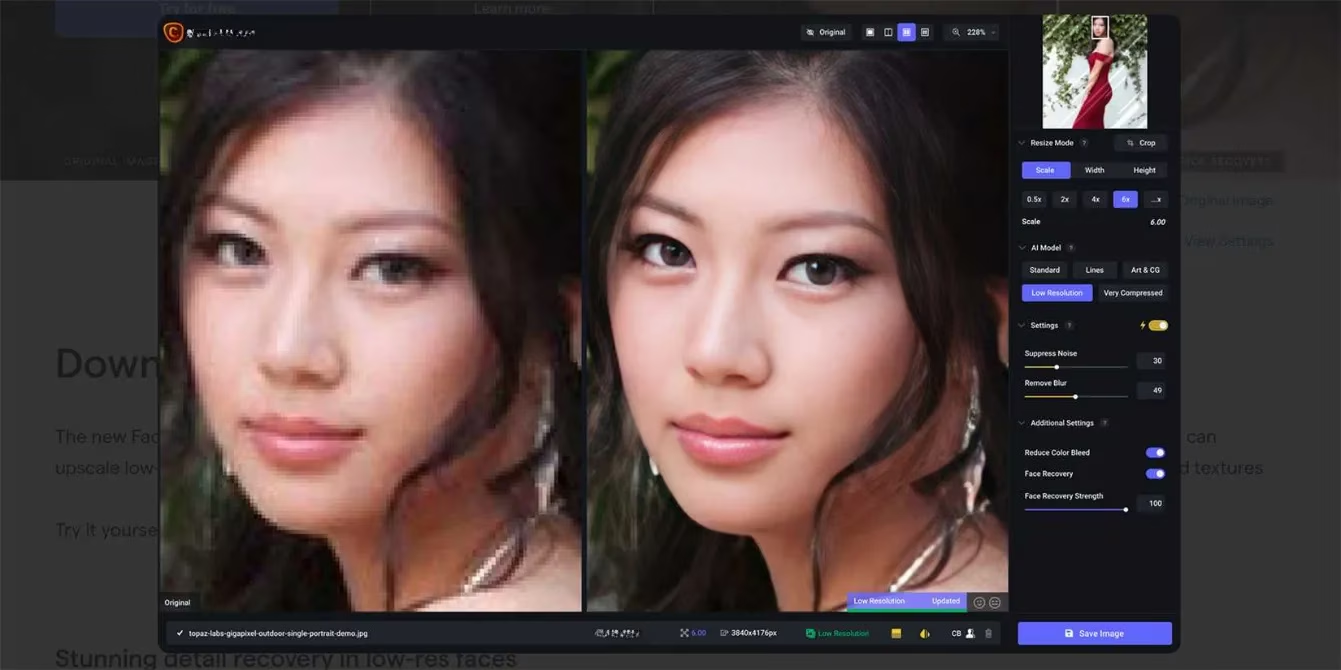
Topaz Photo AI 3 ($199): This is my all-in-one workhorse. Think of it as my intelligent editing assistant. It doesn't just sharpen or denoise; it analyzes the entire image and makes smart suggestions. Need to recover details in a blurry face? It has a dedicated Face Recovery model. Is the noise from a high ISO ruining the shot? Its Denoise feature is arguably one of the best on the market. The beauty is that all these models—sharpening, denoising, face recovery—are built right in and run locally.
-
Gigapixel AI 8 ($99): This tool is a specialist, and it's breathtaking at what it does. Have a small, low-resolution image that you need to print large? Gigapixel is your answer. It uses AI to upscale images up to 600% (that's 6x!) while intelligently adding realistic detail, not just blurry pixels. It's saved countless old digital photos and web images for me.
The Game-Changer: Autopilot & Local AI Processing
Here's where Topaz Labs separates itself from the crowd of subscription-based, cloud-reliant services. Let's break down the two biggest advantages:
- The Autopilot Brain: When I open a photo in Photo AI, it doesn't just sit there. Its Autopilot feature instantly analyzes the image. Is it slightly out of focus? It suggests a sharpening model and strength. Is there noise? It picks the right denoise setting. These suggestions are applied temporarily so I can see a preview immediately. I can adjust the sliders, accept or reject each suggestion—it saves an enormous amount of time and mental energy deciding where to start. It's like having a professional editor looking over my shoulder, but I'm still in full control.
-
Fully Offline, Fully Private: This is non-negotiable for me in 2026. Every neural network, every AI model that Topaz uses is installed directly on my computer's hard drive. There's no uploading my sensitive client photos or personal videos to some remote server. The processing happens right here, which means:
-
No internet? No problem. I can edit on a plane, in a remote location, anywhere.
-
Blazing speed. Since it's not waiting for a network round-trip, the processing is incredibly fast, especially on a modern GPU.
-
Complete data privacy. My work never leaves my machine.
-
Compared to tools like Luminar Neo, which require a constant connection, this local approach is both empowering and essential.
Beyond Photos: Conquering Video with Topaz Video AI
My work isn't just stills. When I ventured into video, I discovered Topaz had an answer there too.
-
Topaz Video AI 6: This standalone tool (and plugin for DaVinci Resolve/After Effects) is a miracle worker for footage. It can upscale old standard-definition video to 4K or even 8K, stabilize shaky clips, and remarkably, reduce noise and interlacing artifacts that plague older digital video. The latest version in 2026 even includes powerful SDR to HDR conversion capabilities.
-
Topaz Video AI Pro: This is the big leagues. Priced at a professional-grade $1,099, it's built for studios and serious filmmakers. It's the tool trusted by BBC, Amazon, and NASA for their restoration and enhancement projects. The output quality is simply cinematic.
Fitting Into My Workflow: Standalone vs. Plugin Power
Flexibility is another huge win. Topaz understands that editors work in different ways.
| Usage Mode | My Experience & Benefit | Best For |
|---|---|---|
| Standalone Application | Complete independence from Adobe's ecosystem. I open files directly, batch process, and export. It's fast and self-contained. | Editors who want a focused tool or don't use Adobe/Lightroom. |
| Plugin for Lightroom/Photoshop | Seamless integration! I can right-click an image in Lightroom, select "Edit in Topaz Photo AI," and my edits round-trip back perfectly. This preserves my non-destructive workflow. | Editors deeply embedded in the Adobe ecosystem who want Topaz's power without leaving their home base. |
This dual approach means I'm never locked in. I'm not at the "beck and call" of a single company's subscription model or software limitations. Whether I'm using Adobe, Affinity Photo, or just the Topaz tools alone, they adapt to me.
The Secret Weapon: Blazing-Fast Batch Processing
As a professional, time is money. Editing hundreds of photos from a wedding or event individually is a nightmare. Topaz's batch processing is a genuine lifesaver. I can select up to 1000 images, apply a consistent set of AI enhancements (like Autopilot-recommended sharpening and denoising), and let it run. Unlike many other tools that slow to a crawl, Topaz leverages my local GPU power to crunch through the queue with impressive speed. This feature alone has saved me hundreds of hours.
The Pricing Model That Makes Sense: Lifetime License
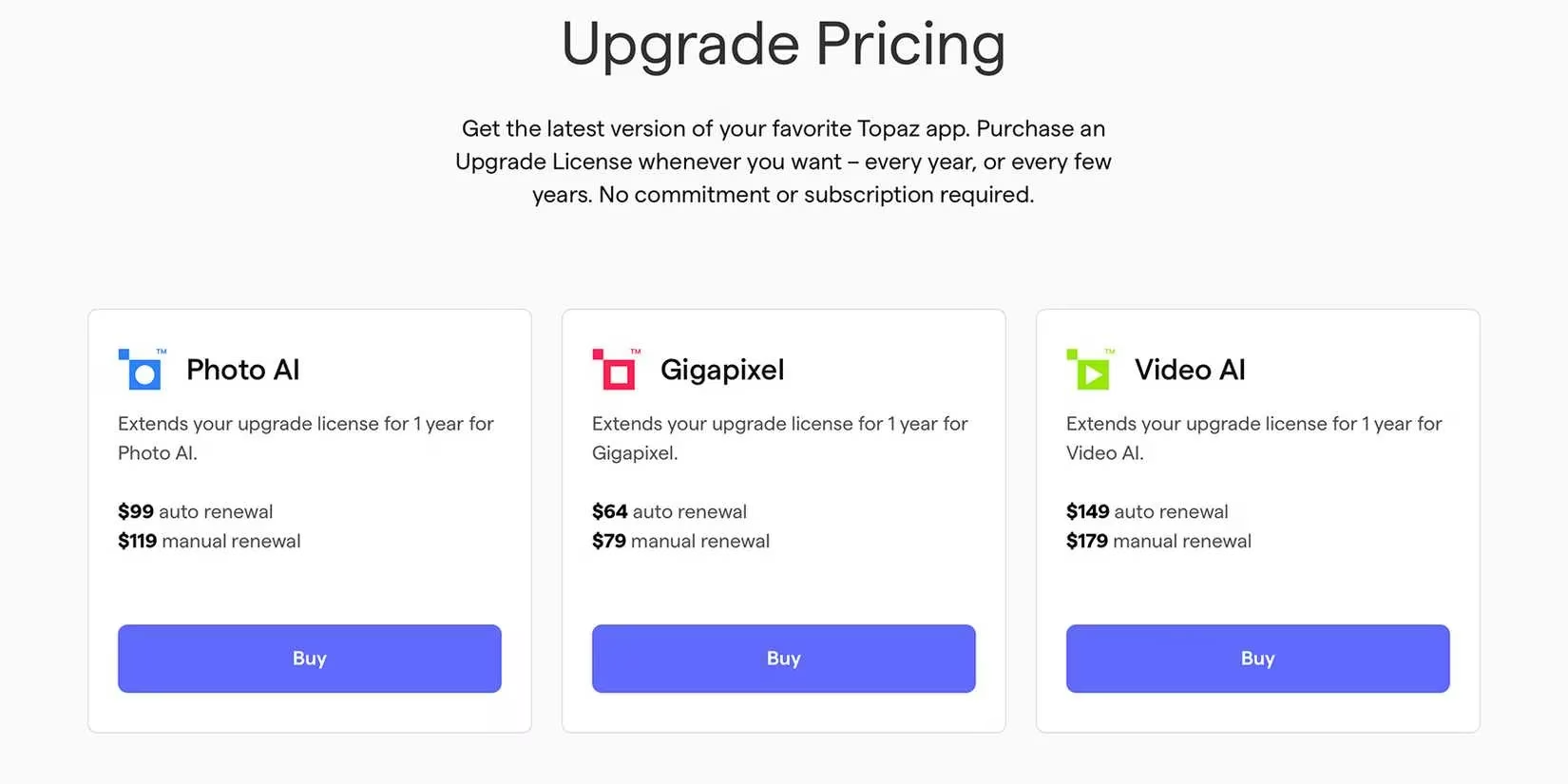
In a world dominated by monthly subscriptions, Topaz's model is a breath of fresh air. You pay a one-time fee for a lifetime license. This includes the current version and one year of free updates (which are frequent and significant). After that year, you can choose to pay a smaller upgrade fee to get the latest version, or simply keep using your perfectly functional software forever.
Let's do a quick comparison for a photographer in 2026:
-
Topaz Photo AI (Lifetime): ~$199 one-time.
-
Adobe Photography Plan (1 Year): ~$240 per year, forever.
Over three years, Topaz costs $199, while Adobe costs $720. For consistent, high-quality results without rental fees, the value proposition is clear. It's an investment in my toolkit, not a perpetual expense.
Final Thoughts: Is Topaz Labs Worth It in 2026?
After years of using these tools, my answer is a resounding yes. Topaz Labs isn't about generative AI creating things that weren't there; it's about intelligently enhancing what already is. It respects the original image while giving you the power to reveal its full potential.
For photographers and videographers who:
-
Value privacy and offline work.
-
Need tangible, non-destructive enhancement (sharpening, denoising, upscaling).
-
Want to save massive amounts of time with Autopilot and batch processing.
-
Prefer owning their software over renting it.
...Topaz Labs is not just another tool; it's a foundational part of a modern, efficient, and high-quality creative workflow. It turned my 'problem' files into portfolio pieces, and in 2026, that's a power I wouldn't want to edit without. 🚀
Comments