 AIImageInsight
Imagine a world where the meticulous, hours-long grind of Photoshop masking is a relic of the past. For years, creatives were shackled to their desktops, slaves to layers and complex tools. But in 2026, a seismic shift has occurred, and it fits right in your pocket. One app, Photoleap, has rewritten the rulebook, merging the raw power of Photoshop with the intuitive magic of Canva and then injecting it with a potent dose of futuristic AI. This isn't just photo editing; it's a creative revolution, condensed into a smartphone screen. Gone are the days of needing multiple apps for editing, design, and effects. Photoleap has arrived, and it's here to make every other mobile editor seem painfully, hilariously obsolete.
The moment you launch Photoleap, you're greeted not by a sterile toolbox, but by a vibrant, welcoming universe of creativity. Its interface pops with energy, clearly designed for the modern creator who values speed and fun over cumbersome menus. Everything is intuitively organized into three core pillars: Discover, Edit, and Generate. This trifecta forms the backbone of an experience that is both incredibly powerful and surprisingly approachable. The Discover section is your mission control, offering a dazzling overview of the app's capabilities. For the social media maestro, it's a goldmine. Need a professional headshot from a casual selfie? Done. Want to magically extract yourself from a cluttered background and place yourself on a Martian landscape? A few taps. This section houses the Social Essentials—tools like background changers, distraction removers, and even head-swappers that would take a Photoshop expert an hour, all executed near-instantly. It’s not just for pros, though. Feel like turning your dog into a cartoon superhero or 'hunkifying' your best friend's portrait for a laugh? Photoleap treats playful creativity with the same seriousness as professional design, and that's its secret weapon.
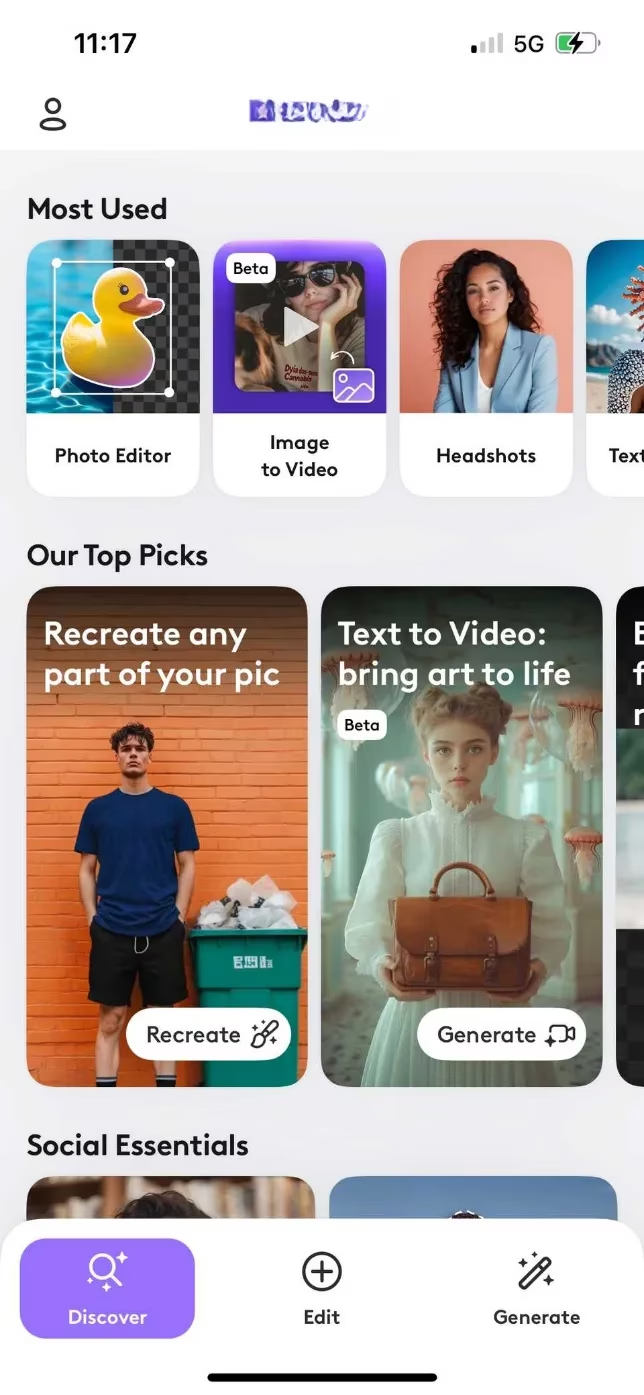
Now, let's dive into the heart of the beast: the Edit section. Coming from a background in professional editors like Lightroom, the initial layout can feel... different. The tools are presented in a linear flow rather than grouped panels. For a seasoned editor, this might cause a moment of panic. But wait! Push past that first impression. Once you acclimatize, you find a treasure trove of advanced tools that shame most basic mobile apps. The joy of selective editing allows you to treat the subject, background, and sky as separate entities, applying adjustments with surgical precision. And then there’s the Curves tool—a holy grail for tonal control rarely seen outside desktop software. This single tool grants you dominion over brightness, contrast, and color in a way that simple sliders never could, letting you craft images with stunning depth and crispness.
Perhaps most impressively, Photoleap includes a dedicated White Balance tool. In 2026, eliminating the amateurish green or purple color casts from your images is non-negotiable for a professional look. While other apps make you fiddle with vague temperature sliders, Photoleap offers a targeted, surefire method to achieve clean, natural color—a feature that instantly elevates your work. But the real party starts with the AI arsenal. The AI Remove tool is witchcraft perfected. Distracting photobombers, ugly power lines, random litter—all vanish with a single tap, leaving behind pristine, believable scenery. It’s so effortless it feels like cheating, a stark contrast to the manual, painstaking cloning of yesteryear.

A word to the wise: with great AI power comes great responsibility. 🚨 The key is subtlety. Zoom in, check your work, and avoid the uncanny valley. The AI's performance is directly tied to your input image quality; feed it a sharp, well-exposed photo, and it will perform miracles. Feed it a blurry, noisy mess, and the results can be... creatively inconsistent. Beyond cleanup, the creative tools are boundless. Generative Fill can dream up new elements, AI Backgrounds can transport your portrait anywhere imaginable, and the Blending options open up a full layer-based workflow for adding text, shapes, and graphics.
If editing isn't enough, step into the Generate section to become a creator from scratch. While AI image generation is robust, the true showstopper is Image to Video. Watch in awe as your static photograph blossoms into a living, breathing scene with seamless motion. Or, inject pure magic with the Animate tool, adding sparkling effects and dynamic elements that make your photos truly pop off the screen. And Photoleap isn't just for portraits! Landscape and real estate photographers can rejoice with tools like Scenes and Rooms, transforming a mundane shot into a jungle adventure, a whimsical fantasy, or gritty urban graffiti with a single command.
So, who is Photoleap for in 2026? Let's break it down:
| User Profile | Perfect For | Maybe Not For |
|---|---|---|
| The Busy Influencer | Rapid-fire, trendy designs for Stories & Reels | Documentary, no-frills journalism |
| The Casual Creator | Party invites, fun pet pics, family pranks | Pixel-perfect, technical photo realism |
| The Hobbyist Photographer | Exploring artistic styles & advanced edits | Replacing a full RAW workflow on desktop |
| The Social Media Manager | Creating a high volume of branded content quickly |
It’s crucial to understand Photoleap's philosophy: it is an engine for artistic and expressive creation, not necessarily for forensic, realistic photography. It won't replace a dedicated RAW processor like Lightroom for a professional wildlife or food photographer's primary workflow. But for jazzing up your kids' birthday photos with confetti and sparkles, or whipping up a polished, eye-catching invitation for a workshop in minutes, it is utterly peerless. It processes RAW files, it evolves constantly, and it packs more creative firepower per megabyte than seems possible.
In the end, the smartest creatives in 2026 aren't loyal to a single tool; they master an arsenal. Photoleap has firmly claimed its spot as the go-to for anything that needs to be fast, fun, and fantastically shareable. It turns complex design into a playful experiment and makes high-end editing feel like a game. The future of mobile creativity isn't coming—it's already here, and its name is Photoleap. Download it, and prepare to never look at your photo gallery the same way again. ✨
Comments