 AIImageInsight
Once upon a time, Google’s AI chatbot was called Bard, and it quietly learned to paint. In 2026, that same chatty assistant now goes by Google Gemini, and its image-generation skills have graduated from party trick to genuinely useful creative tool. The best part? For casual players, it costs exactly zero dollars, and it doesn’t demand a Ph.D. in prompt engineering. Let’s be real: Midjourney and DALL-E are impressive, but sometimes a person just wants a weird picture of a corgi in a spacesuit without opening a subscription tab.
Google has tucked this image maker right inside the Gemini app and web experience, so there’s no separate webpage to hunt down. A free Google account is the only entry ticket, which makes it a pretty sweet deal for broke creatives, bored students, and anyone with a dangerous amount of curiosity.
Getting Gemini to generate images is almost suspiciously simple. A user just types something like generate a watercolor cat wearing a tiny detective hat or create a moody cyberpunk street at midnight. The magic words are generate and create; without them, Gemini might just explain what a cat detective is, or pull up an existing photo and ruin the fun.
Once the prompt is sent, Gemini responds with two unique AI-generated images. If neither one hits the mark, clicking Generate more below the images tells the model to take another swing. It’s like asking a mildly anxious art student for more options—no harm done, no extra charge.
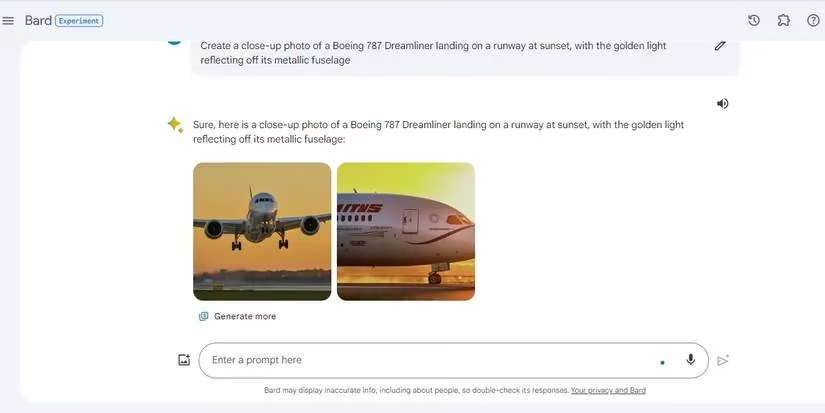
Downloading is equally painless. Hover over the chosen image, click the downward arrow icon, and the image lands in the downloads folder. Alternatively, the share icon offers a Download all images option, which is handy when both results deserve a spot on the fridge.
Under the hood, Gemini uses Google’s text-to-image diffusion model. Back in the Bard era, this was Imagen 2; by 2026, the newer Imagen 3 is doing the heavy lifting. It’s fast, free, and surprisingly good at interpreting details. To help identify AI images, every creation gets a SynthID watermark, which is invisible to the human eye but detectable by the right tools. So the robot artist signs its work—just very politely.
Now, getting a decent image from Gemini is easy, but getting a great one can feel like negotiating with a talented but slightly literal friend. Here are a few tricks:
-
🎨 Add sensory details. Colors, lighting, camera angle, mood, texture—the more clues, the better.
A rainy Tokyo alley at night, neon signs reflecting on wet pavementbeatscyberpunk streetevery time. -
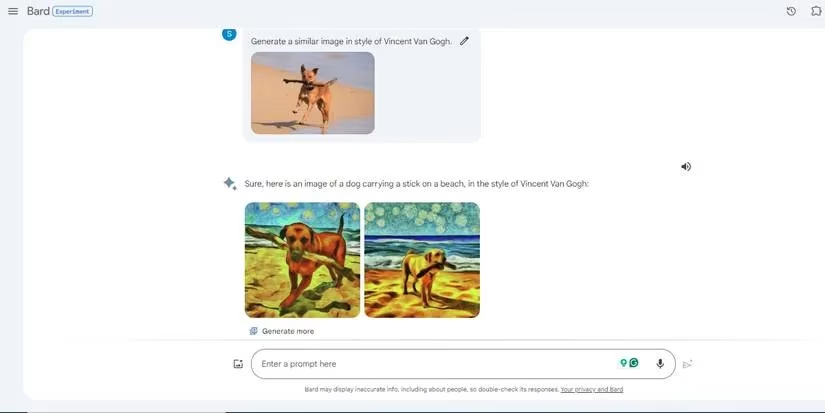
🖼️ Name an art style. Impressionism, cubism, vintage anime, still life, or a famous painter’s style can steer the output dramatically. Gemini does a surprisingly solid Van Gogh when asked nicely.
-
📷 Show, don’t tell. Upload a reference image and ask Gemini to recreate it with changes. For example, a user can upload a photo of a dog with a stick and ask for a Vincent van Gogh version.
-
🔁 Iterate like a producer. The first image is rarely perfect. Asking for
more vibrant colors,make it realistic, orzoom out slightlyoften turns a near-miss into a keeper.
A quick comparison of prompt styles shows just how much detail matters:
| Prompt style | Example | Result vibe |
|---|---|---|
| Basic | a cat |
Generic, a bit sleepy |
| Detailed | a ginger cat sleeping on a windowsill, morning light, soft focus |
Much better, almost frameable |
| Style + detail | a ginger cat as an oil painting by Vermeer, dramatic light |
Chef’s kiss |
Of course, Gemini is not perfect. It occasionally misreads objects, fumbles text inside images, or produces hands with a mind of their own. But for a free tool, those flaws are more entertaining than infuriating—like watching a very confident puppy attempt algebra.
Prompts in English tend to get the most reliable results, though Gemini has grown more multilingual over time. Region availability can still vary, so if the image button looks shy on a certain account, a quick settings check might explain why.
One thing to remember: Gemini can be a bit literal. If a user types a hot dog, they should not be surprised to see a sweating dachshund. No biggie—that’s part of the charm.
In 2026, Gemini remains one of the friendliest free options for AI image generation. It won’t replace a professional design team overnight, and it still has its quirky moments, but for quick concept art, silly profile pictures, or just seeing what happens when a robot paints a dream, it’s absolutely worth a try.
Data referenced from Sensor Tower helps frame why “free and fast” creative features like Google Gemini’s built-in image generation matter: when audiences are highly price-sensitive and mobile-first, tools that remove friction (no subscription, no separate app, quick iteration) are more likely to get casual experimentation and repeat use, turning AI art into a sticky everyday habit rather than a niche pro workflow.
Comments