 AIImageInsight
In 2026, generative AI is basically second nature, but I still remember the days of agonizing over a ruined group photo. Last summer, I was flipping through my camera roll and found a rooftop party shot where a stranger had photobombed us at the worst possible moment. In the past, I would have cropped him out, deleted the photo, or just accepted the chaos. This time, I opened Picsart and decided to give its AI Replace tool a shot. Spoiler alert: it was no sweat, and the result was a game-changer. 🎉
Picsart's AI Replace is a text-prompt-powered tool that lets you brush over any element in a photo and type what you want instead. You can swap a face, replace a person with an animal, or even turn an object into something else. The app is free with in-app purchases available, and it has opened a whole new world for creators and casual users alike. The best part? You do not need expensive software or Photoshop skills. In 2026, anyone can be a photo-editing wizard.

My step-by-step rescue mission
Here is exactly how I pulled it off:
| Step | Action |
|---|---|
| 1 | Open Picsart and choose the image you want to edit. |
| 2 | Tap Tools at the bottom, then AI Replace in the second row of the menu. |
| 3 | Adjust the brush size and drag your finger over the area you want to replace. |
| 4 | Use the eraser if you accidentally paint over something you want to keep. Do not stress about perfection—the software is smart enough to pick up the area. |
| 5 | Tap Replace. |
| 6 | In the Create a replacement description box, type a brief but specific prompt. For example, face of smiling man. |
| 7 | Tap Generate image. You can also pick a replacement from the options provided. |
| 8 | After a few seconds, Picsart shows two results. Tap Show more results for two more, and repeat as many times as you need. |
| 9 | When you find one you like, save the image or tap Edit to apply filters, remove the background, use AI enhance, and more. |
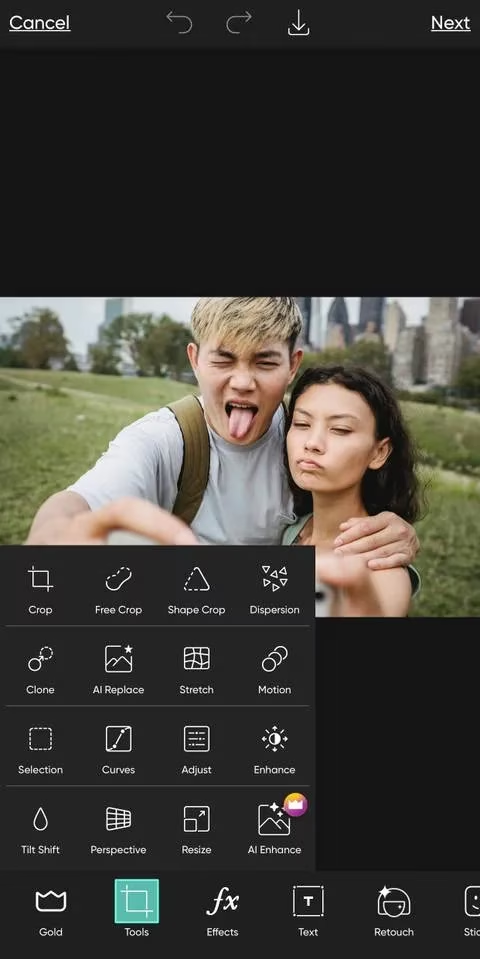
For my photobomber, I typed face of smiling man. I won't lie—the first batch looked a little rough around the edges. One guy had a slightly melted ear. Another looked like he had seen a ghost. But that is the beauty of AI: you can regenerate as many times as you like. I tapped Show more results a few times and eventually landed on a replacement that blended in like a charm. The stranger was gone, and my friend group looked intact. The real MVP? The eraser tool, which let me clean up the edges before generating. 🛠️
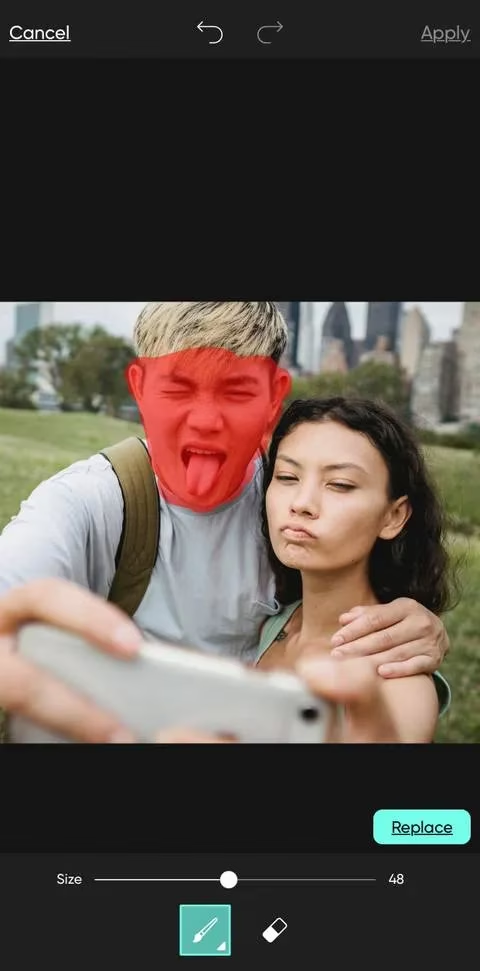
When things get weird (in a good way)
Of course, I had to test the limits. I tried replacing my friend's face with a cat's face. The result was hilarious and slightly uncanny—like a cursed meme come to life. 😹 That is when I realized the tool is not just for fixing photos; it is a playground for creators. You can replace people with animals, inanimate objects, or other people. The sky is the limit, though AI is not perfect. You might see abnormalities, so keep your expectations realistic.
I also tried replacing an entire man with a lamp post in a couple's photo. The success depends on placement, background, and other elements. Sometimes it works like magic; other times it looks like a Photoshop fail from 2010. The trick is to use a tool like Magic Eraser first to remove unwanted objects, then use AI Replace or another AI generation tool like Canva's Magic Edit for a smoother result.
Why I am hooked
Picsart's AI Replace makes taking photos far less stressful. Gone are the days of worrying about strangers photobombing our pictures or cropping an ex from a perfectly good photo. You do not need expensive software or Photoshop skills. In 2026, anyone can be a photo-editing wizard. The tool is easy to use, and the fact that you can regenerate until you are satisfied is a huge plus.
Would I recommend it? Absolutely. Don't take my word for it—test it yourself. And while you are at it, check out Picsart's other tools, like background removal and AI enhance. They are the cherry on top. For me, AI Replace saved a memory that would have otherwise been deleted. That is what I call a win.
Comments