 AIImageInsight
FigJam, Figma's native collaborative digital whiteboard, has steadily become a more intelligent workspace thanks to a growing set of artificial intelligence capabilities. Originally introduced in an open beta in November 2023, FigJam AI combines automation, organization, and prompt-based assistance for designers and non-designers. In 2026, as distributed teams lean further into visual collaboration, these features act as a quiet personal assistant for launching meetings, clustering ideas, and turning messy workshop artifacts into clear action points.
Native AI Tools Follow Figma's Config Momentum
Figma began adding generative capabilities to its design platform in mid-2023, with announcements at Config 2023, the company's annual user conference. FigJam followed shortly after, bringing its first native AI tools to the collaborative whiteboard in November 2023. The move aligned with Figma's broader expectation that more AI features would appear across its product ecosystem. For teams that use FigJam to structure workshops, run design sprints, or map customer journeys, the new AI layer reduces the manual effort of preparing and organizing shared boards.
🧠 Text Prompts Generate Workspaces Instantly
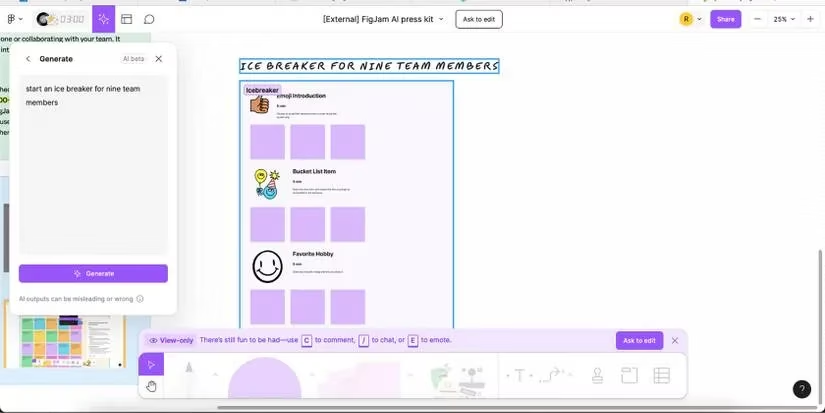
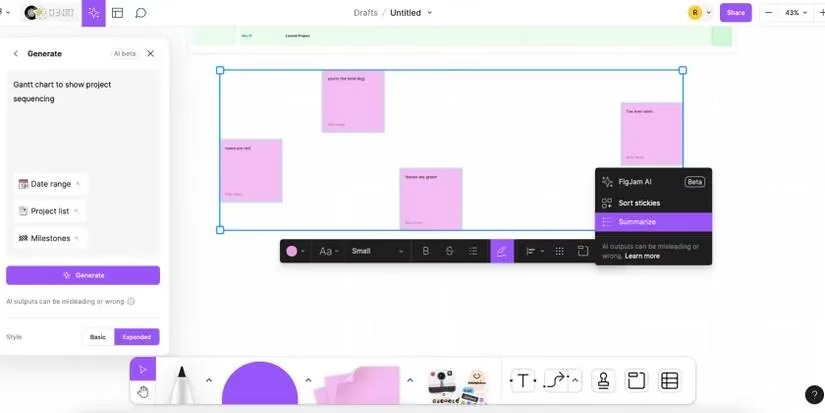
FigJam AI offers a dedicated generator box that users can open by selecting the Generate icon in the top-left corner of the interface. Powered by OpenAI technology, the AI accepts freeform text instructions and creates ready-to-use collaborative structures. Teams can type a simple request or a highly detailed prompt, and FigJam will deliver a corresponding board.
Common FigJam prompt examples include:
-
Start an ice-breaker for nine team members.
-
Weekly kickoff meeting.
-
Plan a week's schedule for our deadline.
The more specific the input, the more relevant the generated output tends to be. Figma has cautioned that AI outputs may be misleading or wrong, especially during the open beta period. However, user feedback helps the generator improve over time, making the tool more reliable for everyday facilitation tasks.
⚡ Click-and-Go Prompts Adapt to Team Habits
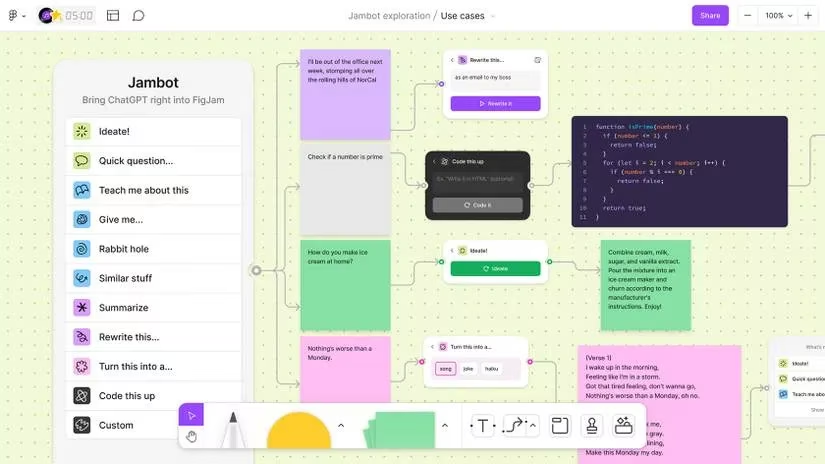
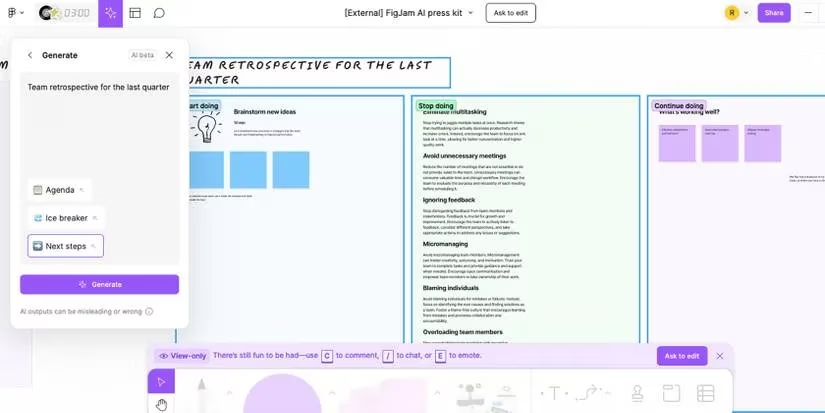
Beyond freeform generation, FigJam AI includes a library of click-and-go prompts that appear under the same Generate menu. These suggestions are not static: they adapt based on how a team has previously used FigJam. For example, if a group usually opens every collaborative session with a five-minute brainstorming exercise, FigJam can detect that pattern and surface the prompt automatically.
This predictive behavior saves time on routine tasks and lowers the barrier for new users who may not know how to phrase an AI request. Click-and-go prompts can also be mixed with custom text prompts, giving teams a flexible starting point for meetings, retrospectives, and planning workshops.
📌 Automatic Sticky Note Grouping by Theme
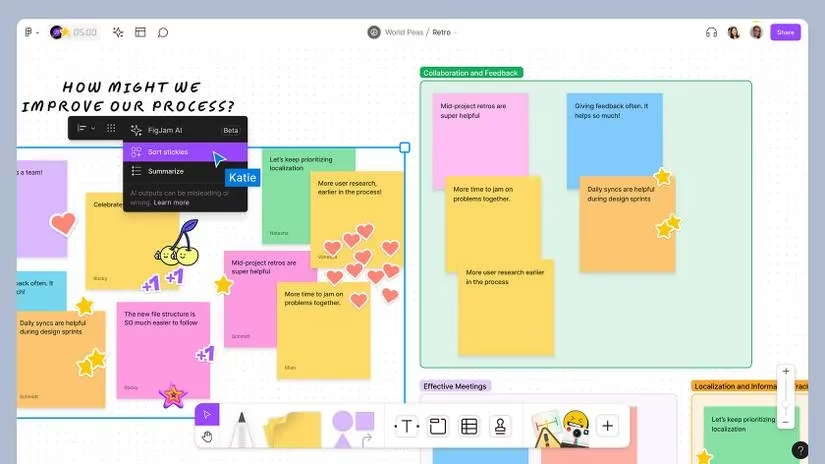
One of the most practical additions in FigJam AI is the ability to group sticky notes by theme automatically. In active brainstorming sessions, a whiteboard can quickly become filled with dozens or hundreds of sticky notes from multiple participants. Manually sorting those notes into clusters takes time and can interrupt the flow of discussion.
With the latest AI features, FigJam can identify thematic similarities and organize sticky notes without any manual effort. This makes large workshops more digestible and helps facilitators jump straight into analysis rather than cleanup. The feature is especially valuable for remote teams who rely on FigJam to capture ideas asynchronously across time zones.
📝 Summarize Dense Collaborative Content
Even after grouping sticky notes by theme, the volume of information on a FigJam board can still feel overwhelming. FigJam AI addresses this with a summarizing tool. Users can highlight text, items, and comments with the cursor, right-click, and choose Summarize. The AI then compresses the selected content into a clear, easier-to-read mini-document.
The summary organizes information into fluid paragraphs and bullet points that any team member can understand. The summarized window can be moved around the screen, copied, and shared with anyone who needs a quick recap. This is useful for project stakeholders who were not present during a workshop but still need to understand the key outcomes.
💳 Pricing and Availability in 2026
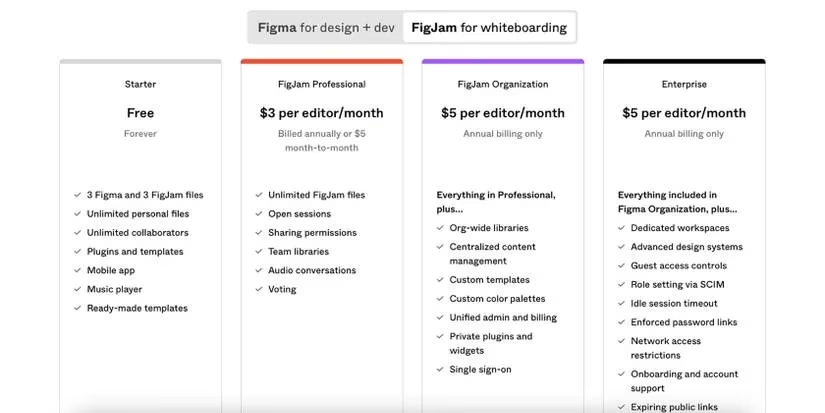
Free Figma users can access up to three FigJam boards at no cost. Users who need more FigJam access can subscribe to one of Figma's FigJam subscription models, which were priced at either $3 or $5 per month when the AI features launched. These plans can be combined with any Figma price model.
| Plan | FigJam board access | AI features |
|---|---|---|
| Free Figma | Up to 3 boards | Included in the open beta at launch |
| Paid FigJam add-on | Additional boards | Included with subscription |
Figma has not stated whether FigJam AI will remain part of the Free Forever model indefinitely. If it does, free users would still be limited by the three-board maximum. Since the open beta began on November 7, 2023, FigJam AI has grown through community feedback and remains a core part of the platform's collaborative toolkit in 2026.
A Smarter Whiteboard for Designers and Non-Designers
The addition of AI to FigJam brings meaningful benefits to a collaborative whiteboard that already supported brainstorming, planning, and structured teamwork. These features can save time, boost group morale by reducing administrative friction, and improve understanding among team members. For non-designers working alongside design teams, FigJam AI lowers the learning curve and makes participation feel more natural.
As Figma continues to refine its AI assistant in 2026, the tools introduced in the FigJam open beta are likely to remain central to how teams prepare, run, and summarize collaborative sessions. The result is a more efficient whiteboard experience that helps teams move from scattered ideas to aligned actions faster than before.
Comments