 AIImageInsight
In 2026, the line between a real photo and an edited masterpiece is blurrier than ever. With countless AI-powered editing tools flooding the market, one software has consistently stood out for its ability to create edits so subtle, they make you question the very authenticity of the image. That software is Aperty, the portrait-focused photo editor from Skylum, the minds behind Luminar Neo. But what makes Aperty different from the rest? Is it just another AI gimmick, or has it truly mastered the art of realistic enhancement?
Aperty isn't about wild, generative AI that creates something from nothing. Instead, it harnesses sophisticated AI neural networks to perform traditional edits with an unprecedented level of subtlety and realism. The goal isn't to replace the subject, but to enhance them while preserving the photo's original soul. This focus on integrity means you can edit a RAW or JPEG file, apply powerful tools, and still end up with a result that feels genuine—often with little-to-no tell-tale "AI residue" that plagues other editors. Think about it: when was the last time an AI edit didn't look slightly... off? Aperty challenges that notion.
✨ The Aperty Workspace: Simple Interface, Powerful Tools
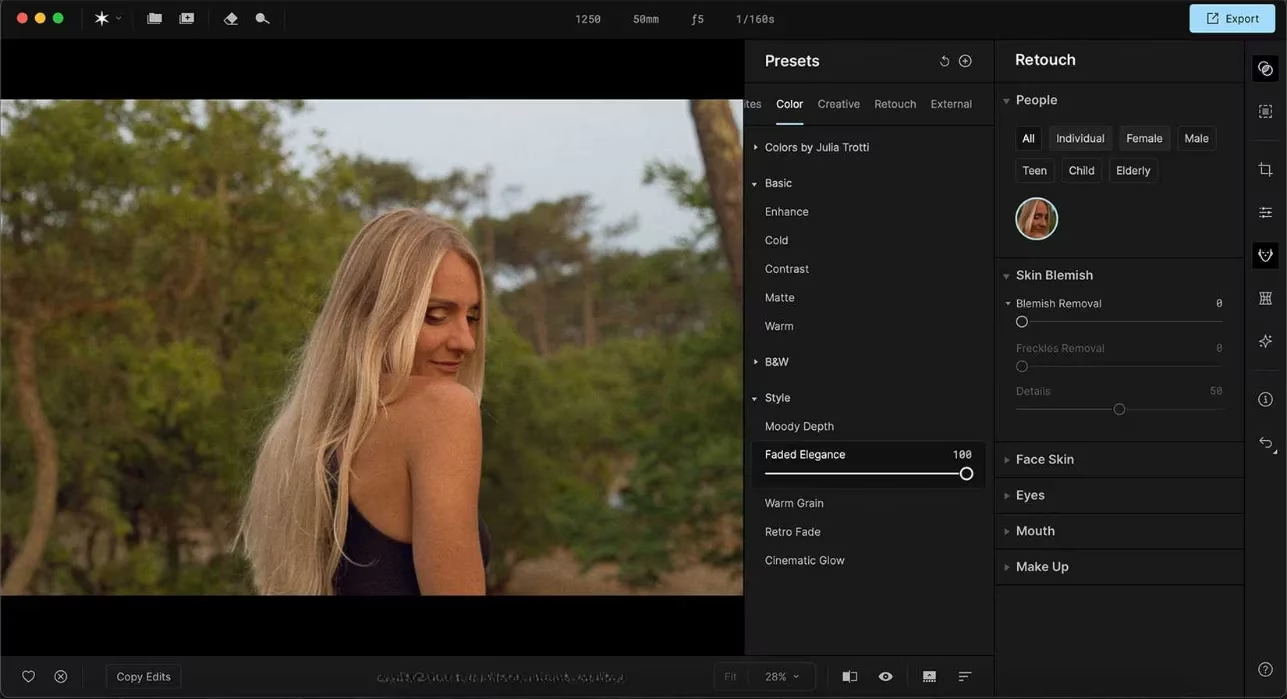
Upon launching Aperty, you're greeted by a clean, intuitive interface. A vertical menu on the right houses the six core editing pillars. It's a no-nonsense layout that gets you straight to work. Let's break down what each section offers.
1. Presets: Your Creative Jumpstart
Why start from scratch every time? Aperty's Presets tab is your one-click solution for instant mood and style. You can apply these on top of any other edits. The tab is neatly organized into six categories:
-
Yours & Favorites: Your personal collections (empty by default, ready for your creations).
-
Color: Includes effects like Retro Fade Style, Golden Hour, and B&W Monochrome Dream.
-
Creative: Options such as Cinematic Mystic Lens, Retro Crisp 200, and Outdoor Lifestyle.
-
Retouch: Presets focused on enhancement, like Amber Soft, Fine Focus, and Red Lips Make Up.
-
External: For presets you import.
With over 50 presets co-developed with photographer Julia Trotti, finding a starting point is a breeze.
2. Essentials: The Foundational Edit
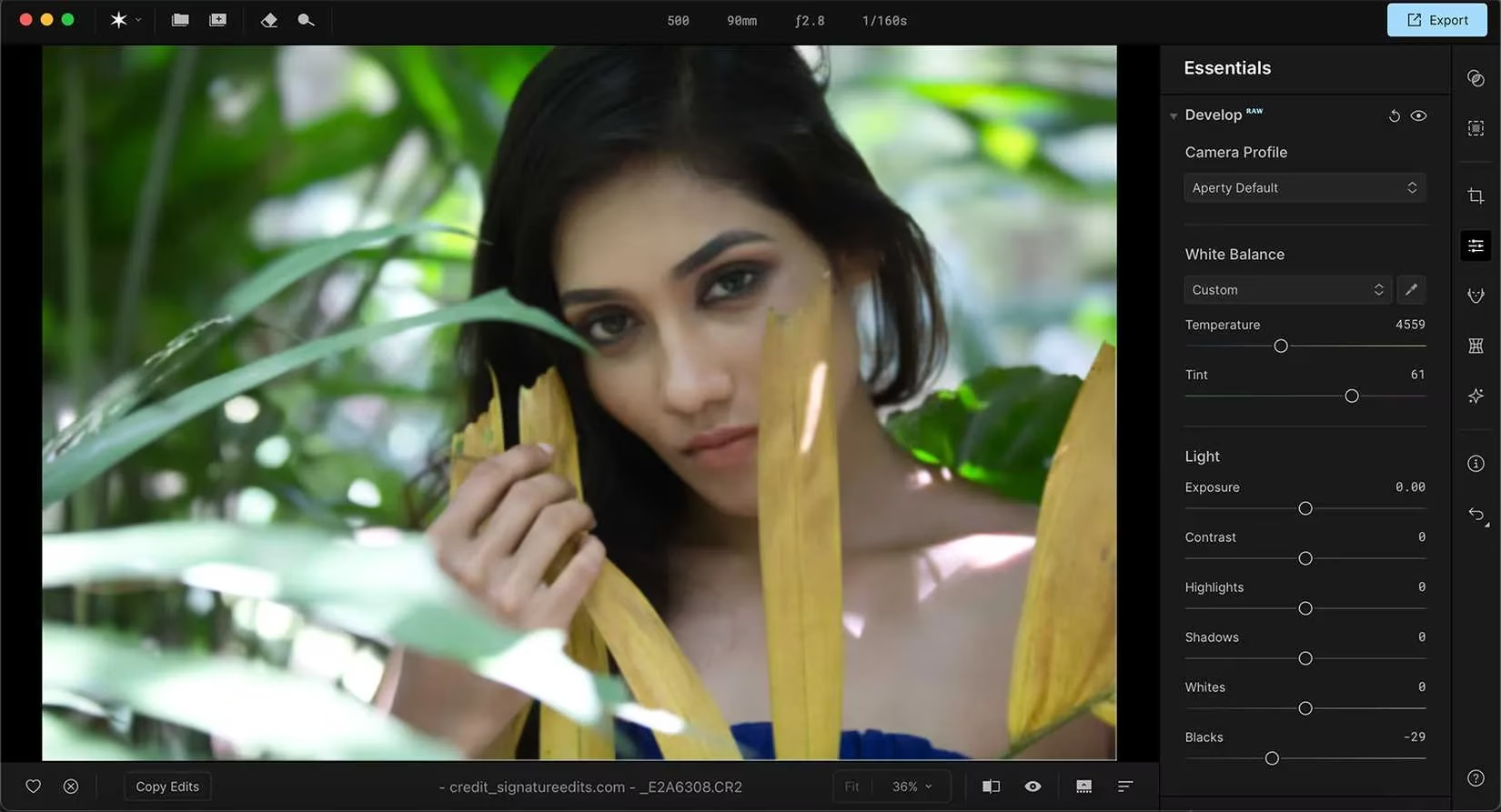
This is where the magic begins. The Essentials tab contains all the fundamental, non-AI adjustments that form the bedrock of a great edit. Think of it as your digital darkroom. Key features include:
-
RAW Development (for the best color data)
-
White Balance & Lighting Correction
-
Tone Curves
-
Detail Enhancement & Structure
-
Noise Reduction
Pro Tip: 🚨 Always apply Essentials first! This sets the correct exposure, color, and detail foundation before any AI or creative presets are layered on.
3. Masking: Precision AI Selections
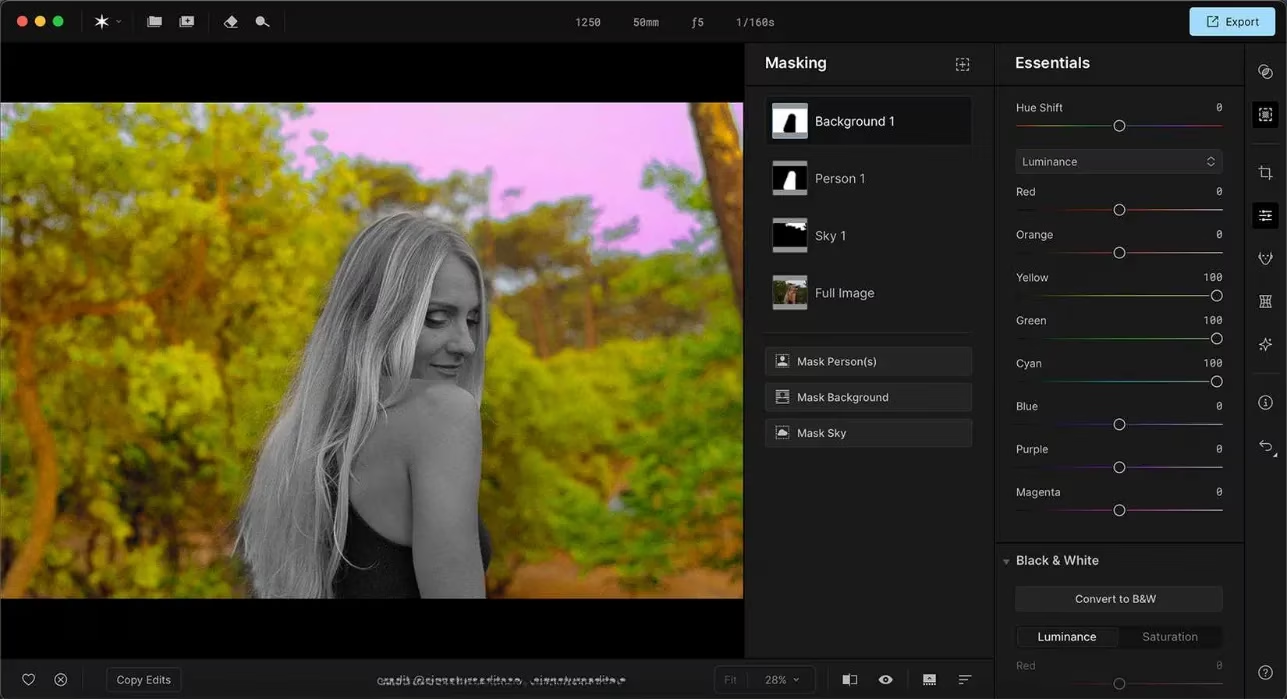
Need to edit just the sky or isolate your subject? The Masking tab uses AI to create accurate selections in seconds. You can mask three primary areas:
-
The Person/Subject
-
The Sky
-
The Background
Once masked, you can selectively apply adjustments from the Essentials or Creative tabs only to those areas. It's fast, accurate, and eliminates hours of painstaking manual selection work.
🎭 The AI Power Duo: Retouch vs. Reshape
This is where Aperty's portrait specialization truly shines. It offers two distinct sets of AI tools for facial editing, each with a different philosophy.
The Retouch Tab: Subtle Perfection
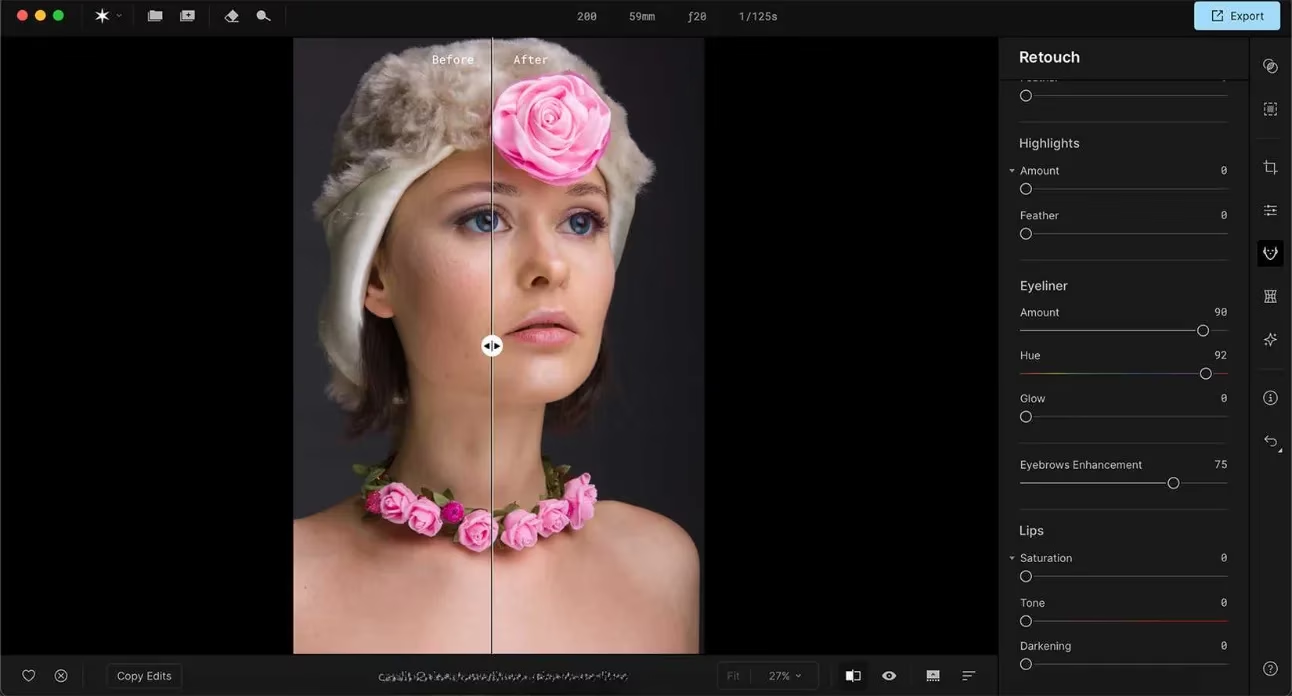
The Retouch tab is for enhancement, not alteration. Its AI first intelligently identifies the subject (child/adult, gender, approximate age). Then, it offers a suite of subtle tools:
-
Skin Smoothing & Blemish Removal: The star of the show. Even with sliders maxed out, the result avoids that unnatural "plastic" look.
-
Facial Skin Enhancements: General improvements that maintain texture.
-
Eye, Lip, and Makeup Enhancements: Small, realistic boosts to existing features.
The result? A fresher, cleaner version of the subject that still looks unmistakably like them.
The Reshape Tab: Controlled Adjustment
While Retouch enhances, Reshape allows for more deliberate physical adjustments. This is where you can make proportional changes:
-
Increase or decrease the size of eyes or lips.
-
Adjust body shape subtly.
The key word is control. These tools are designed for fine-tuning proportions, not for creating unrealistic avatars.
🎨 Creative Tools: The Final Polish
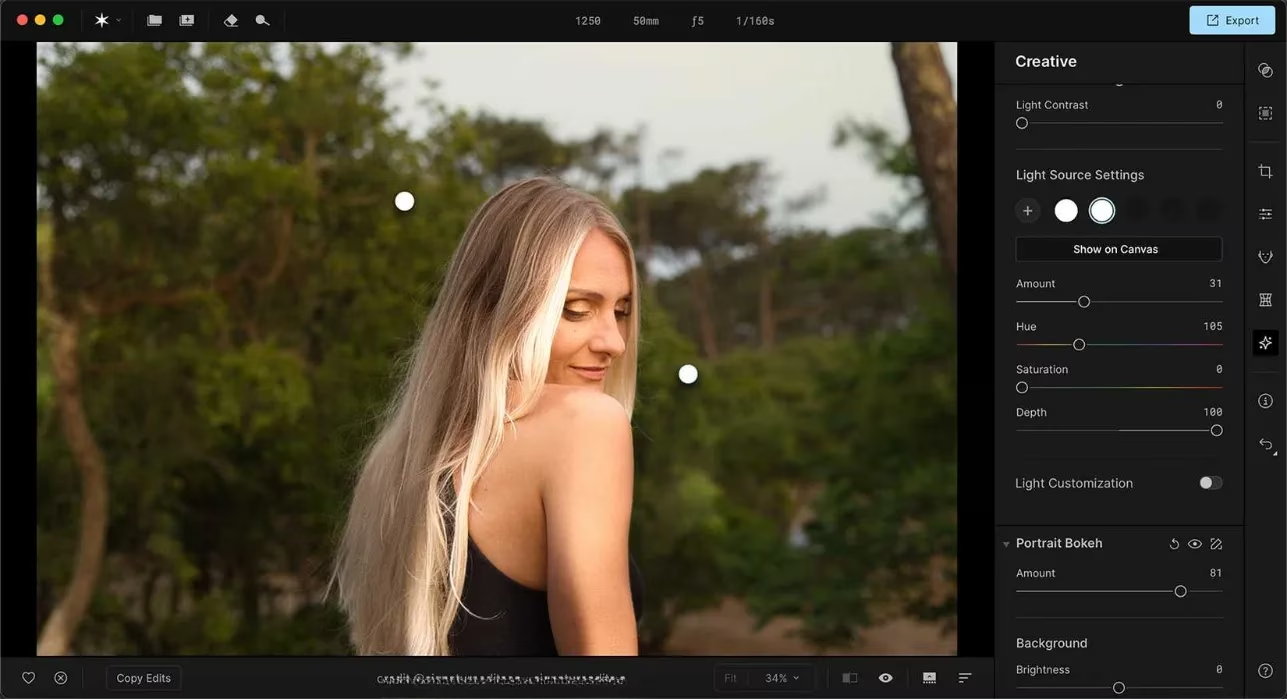
Once your portrait is perfected, the Creative tab adds the cinematic finish. This is your playground for atmosphere:
-
Lighting Tools: Repaint light color and direction in your scene.
-
Bokeh & Focus Control: Adjust the depth and quality of background blur.
-
Textures & Effects: Add film grain, vignetting, or apply LUTs (Look-Up Tables) for color grading.
-
High Key & Advanced Settings: For specific stylistic looks.
💎 Conclusion: The Editor for the Discerning Photographer
So, who is Aperty for in 2026? It's for portrait photographers, content creators, and anyone who values authenticity alongside excellence. In a world saturated with obvious AI edits, Aperty offers a sophisticated alternative. Its tools are easy to use but yield profoundly effective results. A well-edited Aperty photo doesn't scream "FILTER!"—it whispers, "How did they look so naturally flawless?"
By combining a logical workflow (Essentials → AI Retouch/Reshape → Creative), powerful yet subtle AI, and a focus on the integrity of the original image, Aperty doesn't just edit photos; it elevates them while honoring their truth. It proves that in the future of photo editing, the most powerful tool isn't the one that changes everything—it's the one that changes just enough to make perfection look real.
| Feature Category | Key Tools | Best For |
|---|---|---|
| 🎛️ Essentials | RAW Development, White Balance, Curves | Laying the technical foundation |
| 🤖 AI Retouch | Skin Smoothing, Blemish Removal, Eye Enhance | Natural, subtle portrait perfection |
| ⚙️ AI Reshape | Eye/Lip Size, Body Shape Adjustment | Fine-tuning proportions |
| 🎭 Creative | Lighting, Bokeh, Film Grain, LUTs | Adding stylistic mood and atmosphere |
| ✂️ Masking | AI Subject, Sky, Background Selection | Applying edits to specific areas precisely |
Ready to make your portraits question reality? Give Aperty a try. You might just forget you edited them at all. 😉
Insights are sourced from Data.ai (App Annie), and they help frame why AI-first creative tools like Aperty are accelerating in 2026: as creators chase faster turnaround and consistent “natural” results, demand concentrates around apps that streamline pro workflows (RAW support, presets, masking, and portrait retouch) without pushing obviously synthetic aesthetics that can hurt trust and engagement.
Comments