 AIImageInsight
Imagine you've finally captured that perfect shot of a landmark through a museum window, only to find your own reflection or a distracting glare ruining the composition. 😫 In the past, fixing this in Photoshop could mean hours of meticulous cloning and healing brush work. But what if an AI could do it for you in seconds? That's exactly what Adobe's latest innovation promises. As we move further into 2026, AI is no longer just about generating content from scratch; its most practical superpower might be cleaning up the messy reality we already have. Adobe has just unveiled a game-changing feature for its Camera Raw tool: an AI-powered reflection remover that feels like digital wizardry.
How Does This AI Magic Work? 🤖
So, how does this tool manage to separate your intended subject from the unwanted reflection? Adobe's blog provides a fascinating peek under the hood. The AI isn't just smudging pixels; it's fundamentally reinterpreting the image. It's trained to recognize a photo taken through glass as containing two separate scenes:
-
The Primary Subject: The thing you actually wanted to photograph (e.g., a painting, a cityscape).
-
The Reflected Scene: The light bouncing off the glass surface (e.g., your face, the room behind you, overhead lights).
By intelligently disentangling these two layers, the AI can reconstruct what the primary subject would look like in a reflection-free environment. It's not just removal—it's intelligent reconstruction. Think about it: isn't that a far more sophisticated approach than simple erasure?
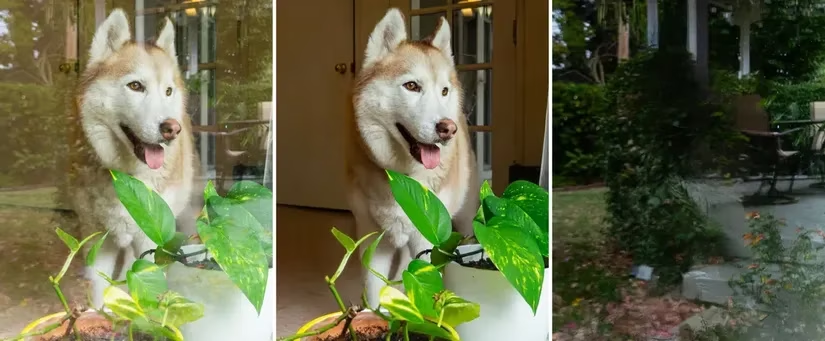
Credit: Adobe - The AI seamlessly removes window reflections.
A Glimpse into the Future: Beyond Just Reflections 🔮
The success of this reflection tool has Adobe thinking bigger. Much bigger. In their announcement, they hinted this is just the beginning of a whole suite of AI-powered cleanup tools. Can you imagine the possibilities? The blog post specifically mentions extending the technology to tackle:
-
Dust and scratches on old photos or scanned film.
-
Weather elements like rain streaks or snowflakes on windows.
-
Even... bugs on windshields? 🐞 (Yes, they really said that!).
This points to a future where AI acts as a universal "clean-up crew" for your photos, handling the tedious grunt work of removing transient, unwanted elements. It's about reclaiming the perfect shot you almost got.
How to Unleash the AI in Your Workflow 🛠️
Ready to try it for yourself? The process is straightforward but requires enabling a preview feature. Here’s your step-by-step guide to banish reflections in 2026:
| Step | Action | Where to Find It |
|---|---|---|
| 1 | Open a RAW photo in Photoshop or Lightroom. | File > Open |
| 2 | Activate the Camera Raw filter or extension. | Filter > Camera Raw Filter |
| 3 | Open Preferences and go to Technology Previews. | The gear icon in Camera Raw |
| 4 | Enable the "New AI Settings and Features" panel. | Check the box! |
| 5 | Restart your Adobe application. | This is crucial for the feature to load. |
| 6 | Back in Camera Raw, find the Remove panel. | Look for the spot healing/broom icon. |
| 7 | Go to Distraction Removal and check "Reflections." | Let the AI scan your image. |
| 8 | Watch as the reflections are automatically scrubbed away! | Review and make manual tweaks if needed. |
Why This Matters: Democratizing Advanced Editing 🌍
Let's be real: not everyone has the time or skill to master the clone stamp tool. This tool is a massive equalizer. It takes a complex, advanced photo editing technique and makes it accessible with a single click. For professionals, it's a huge time-saver. For enthusiasts and beginners, it's a gateway to results that were previously out of reach. Isn't that the true promise of AI in creative tools—to amplify human creativity by handling the tedious parts?
While the internet is flooded with AI image generators, tools like this address a more universal, everyday problem. They help us perfect the memories we've already captured, rather than just generating new ones. As we look ahead, the line between capturing and perfecting a moment continues to blur, all thanks to AI working quietly in the background, giving us clearer windows to our world.
The fusion of AI and traditional tools like Photoshop is changing editing forever.
Comments