 AIImageInsight
As a professional gamer who often streams and creates content, my digital persona is my brand. In 2026, having crisp, professional-looking portraits for thumbnails, social media, and promotional material is non-negotiable. I've spent considerable time testing the leading AI-powered portrait editors to find which one truly delivers for a creator's demanding workflow. My journey led me to a head-to-head comparison between two prominent contenders: Aperty and Retouch4Me. While both promise to democratize professional editing, my hands-on experience revealed distinct philosophies and results, much like comparing a versatile, all-in-one gaming peripheral to a set of highly specialized, premium-grade components.
Core Philosophy & Pricing Models
The fundamental difference between these tools is their approach. Aperty is a comprehensive, subscription-based suite from Skylum, the minds behind Luminar Neo. It functions as a standalone desktop application or a plugin for Adobe Photoshop and Lightroom. As of 2026, its pricing remains on a subscription model, typically around $29.95 monthly or $299 annually, though sales are frequent. This model is like having a continuously updated game pass—you always have access to the latest features, but the cost is ongoing.
In contrast, Retouch4Me operates on a boutique, à la carte system. You purchase individual plugins—like "Heal," "Dodge & Burn," or "Eye Brilliance"—for a one-time fee (generally between $125-$180 each), which includes lifetime updates. You can use them as standalone tools, group them in the central Arams hub, or integrate them into Photoshop, Lightroom, or Capture One. This is akin to building a custom gaming PC, investing upfront in specific, high-performance parts you know you'll use.
Interface & Usability: Clarity vs. Centralization
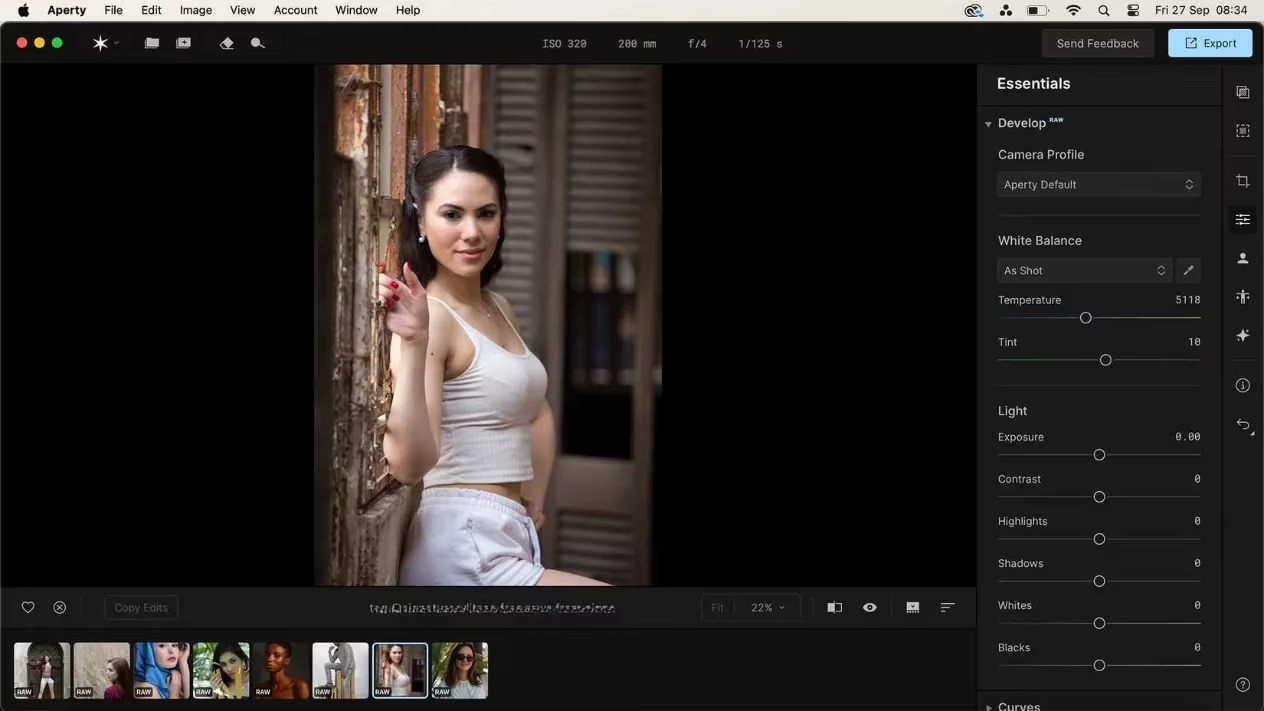
Navigating these tools felt like two different gaming UIs. Aperty's interface is intuitive and inviting. All tools are neatly arranged in menus on the right, with clear icons and helpful tooltips. Basic EXIF data is displayed above the image, and adjustments are primarily made with simple checkboxes and sliders. The workspace feels open and dedicated to your portrait, allowing for focused editing.
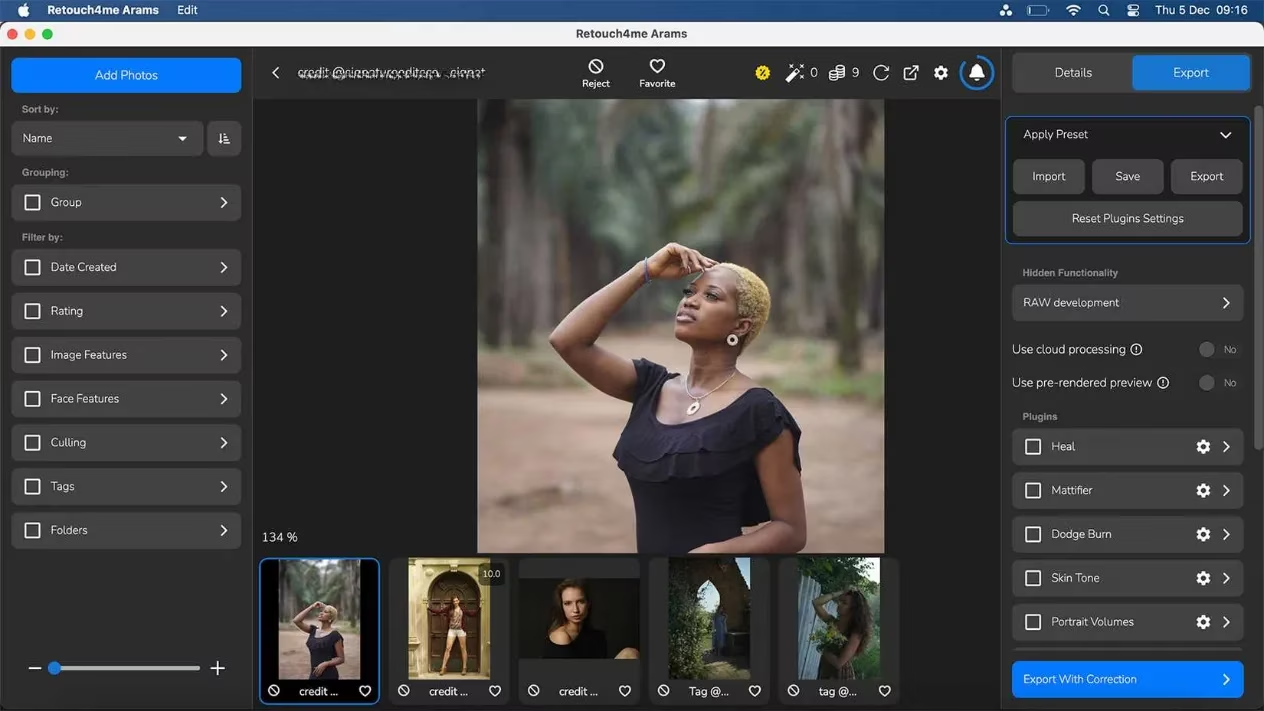
Retouch4Me's Arams hub, which acts as a central dashboard for your purchased plugins, is functional but slightly more cluttered. With menus on both the left and right and a large thumbnail preview below, it can feel like your editing canvas is slightly squeezed. The experience is efficient, especially when applying multiple plugins at once, but it lacks the streamlined, minimalist feel of Aperty.
The Retouching Showdown: Skin & Face
This is where the rubber meets the road. For skin retouching, which includes smoothing, blemish removal, and tone evening, I tested both extensively.
-
Aperty's "Retouch" category delivered impressively subtle and natural results. The
Skin BlemishandFace Skinoptions removed imperfections without creating that dreaded "plastic" look. TheDark Circles Removalwas particularly effective. The controls offer a fine balance between effect strength and detail preservation, preventing over-smoothing. It felt like applying a skilled, real-world makeup artist's touch digitally. -
Retouch4Me, using a combination of Heal, Mattifier, and Skin Tone plugins, also produced good results. However, I noticed it could sometimes apply an unnatural matte effect in areas with direct light, flattening the natural luminosity on a subject's nose or cheekbones. Its subtlety is a strength but can sometimes be a limitation when you desire more pronounced, yet controlled, corrections.
🏆 My Verdict on Skin: Aperty takes this round for its superior balance and more natural-looking finish.
Eye Enhancement: Bringing Portraits to Life
The eyes are the focal point of any portrait, and both tools offer specialized features.
-
Aperty's "Eyes" section is incredibly detailed. Beyond basic whitening and enhancement, it offers specific tools for
Iris Color(to add texture and depth),Iris Visibility, andFlare. It also includes non-destructive eye makeup and reshaping features. I could subtly enhance a model's eyebrows and adjust their spacing with precision. The results added a sparkle and depth that felt authentic, not artificial. -
Retouch4Me's eye tools (
Eye VesselsandEye Brilliance) are powerful but can be trickier to master. TheEye Brillianceplugin certainly makes eyes "pop," but on the default settings, the whitening can appear somewhat unrealistic and stark, like over-polished gemstones. While the sliders can be dialed back, achieving a perfectly natural look required more finesse than with Aperty.
🏆 My Verdict on Eyes: Aperty again, for its granular control and more consistently natural results.
Color & Lighting: Creative Control
This category highlights a significant divergence in scope.
-
Aperty boasts a full suite of color and lighting tools. It has standard white balance and tint sliders, creative presets, and a standout
Lightingfeature that lets you add virtual colored light sources to your scene, controlling their hue, intensity, and direction. This is a game-changer for adding dramatic or creative flair without needing a physical setup. -
Retouch4Me's core plugins are not focused on global color grading. It offers separate plugins for
Color Matchand LUT creation/presets, which are additional purchases. For color work, you're expected to use Retouch4Me within another host application like Photoshop or Lightroom. This makes it a powerful specialist within a larger ecosystem, but not a one-stop shop for color.
🏆 My Verdict on Color: Aperty is the clear winner, offering comprehensive, built-in creative controls.
Body Reshaping: A Contentious Arena
Here, my preference flips decisively.
-
Aperty's "Reshape" tab includes
Body ShapeandAbdomensliders. I have significant reservations about these tools. TheAbdomenslider only goes in one direction—making it smaller—which promotes an unhealthy and unrealistic standard. The results can easily become unnatural and warped. In an era where digital authenticity is increasingly valued, these features feel like an unnecessary and potentially harmful gimmick, a relic of older editing mentalities. -
Retouch4Me takes a more ethical and practical approach. It lacks direct body-slimming tools. Instead, it offers a
Fabricplugin designed to clean up wrinkles and shadows in clothing for a neater presentation. It works on the attire, not the body, which I found to be a far more professional and respectful tool.
🏆 My Verdict on Body Tools: Retouch4Me wins on principle and practicality. Its focus is on polish, not alteration of natural form.
Final Thoughts & Overall Winner
After weeks of testing, my conclusion is nuanced.
Aperty is the more versatile and user-friendly all-rounder. Its interface is superior, it renders edits faster, and it packs a vast array of tools—from retouching to color grading to creative lighting—into one cohesive package. For the content creator or photographer who wants a powerful, standalone solution for portrait perfection, Aperty is incredibly compelling. However, its body reshaping tools are a notable flaw in an otherwise excellent package.
Retouch4Me is the precision specialist. Its individual plugins are powerful and, due to the lifetime license, can be a better long-term investment for specific, recurring tasks. Its subtlety is its hallmark, though this can sometimes mean its effects are too faint. It excels as a set of premium tools within a broader editing workflow, much like a curated set of mods that perfect a specific aspect of a game.
For my needs in 2026, where efficiency, natural results, and creative control are paramount, Aperty emerges as my overall choice. Its holistic approach, faster workflow, and superior results in key areas like skin and eyes make it the more effective tool for my daily use. Yet, I deeply respect Retouch4Me's principled, à la carte model and would not hesitate to recommend specific plugins to colleagues who need surgical-level corrections in their existing Adobe or Capture One pipelines. The best tool, as always, depends on the specific mission in your creative campaign.
Comments